We Timed It: 3 Hours and 47 Minutes to Re-Type One Estimate. Here's How We Fixed That.
Article Image
The Experiment Nobody Wanted to Run
Last November, I asked my estimating team to track their time for one month. Not just on estimates, but specifically on data re-entry. The copy-paste-retype grind. Taking a PDF estimate from a carrier or another adjuster and manually plugging it into Xactimate, line by line.
Nobody was happy about the tracking exercise, but they did it. And the numbers were worse than I expected.
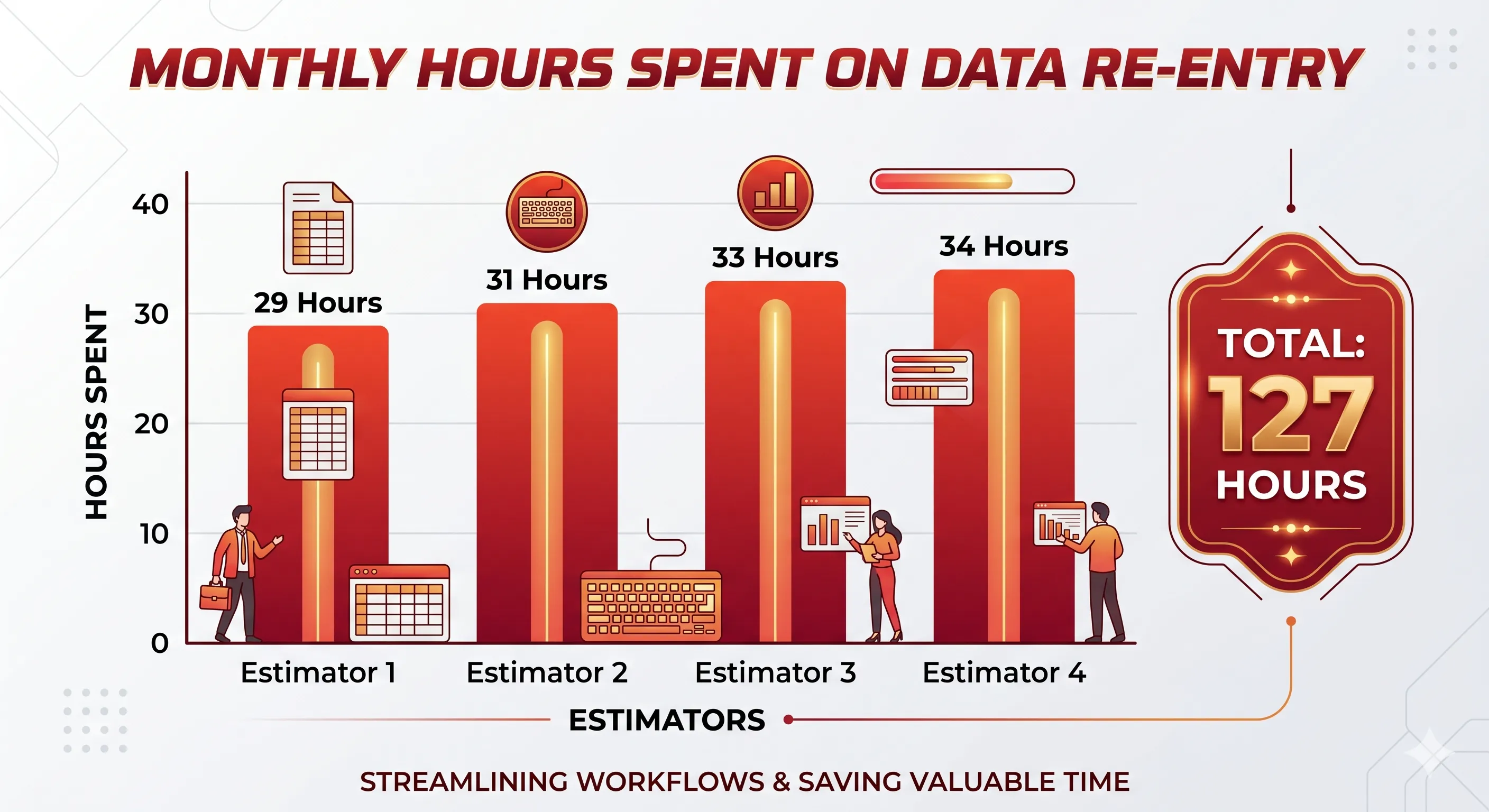
Across our four estimators, we logged 127 hours of pure data re-entry in a single month. That's almost 32 hours per person. Four full working days. Per estimator. Per month. Just re-typing information that already existed in a PDF.
The worst single estimate? A commercial water loss. Restaurant kitchen with extensive damage to three floors. 487 line items. 3 hours and 47 minutes to re-key into Xactimate. And that's with an experienced estimator who's been doing this for 8 years.
I looked at that number and thought: this is broken.
What We Were Actually Doing With All That Time
Let me walk you through what "re-entry" actually looks like, because people outside the industry don't realize how painful it is.
A carrier sends us their estimate as a PDF. This happens maybe 15-20 times a week at our volume. We need that estimate in our Xactimate instance so we can write supplements, plan production, order materials, and build job budgets.
So the estimator opens the PDF on one monitor. Opens Xactimate on the other. And starts the grind.
Read the first line item on the PDF: "R&R drywall 1/2 inch, Level 4 finish." Switch to Xactimate. Navigate to the right room in the project tree. Search for the line item code. Type "drywall" and scroll through 40+ results to find the right one. Is it DRY 1/2? DRY 1/2 - WR? DRY 1/2 - FR? Depends on the location and fire rating. Enter the quantity. Is it 847 SF or 84.7 SF? The PDF formatting is ambiguous. Double-check. Tab to the next field. Check the unit cost against the PDF. If the carrier used a different price list month, the numbers won't match. Add the F9 note if there is one. Move to the next line item. Repeat 486 more times.
The whole time, you're fighting Xactimate's search function (which is bad), watching it freeze every 15 minutes (which is common), and praying it doesn't crash and lose the last 30 minutes of work. That happens at least once a week. One of our guys on the G2 reviews page wasn't kidding when he said "crashes every 5 to 10 minutes."
What We Changed
After the time-tracking exercise, I started looking for solutions. Tried a few things.
Attempt #1: Outsource to Fiverr. Found people who'd do PDF-to-ESX conversion for $25-40 per file. The quality was hit or miss. Turnaround was 1-3 days, which killed us on time-sensitive claims. And on complex commercial estimates, the freelancers made enough errors that our team spent an hour cleaning up the output anyway. Net savings: maybe 50%. Not enough.
Attempt #2: Hire a dedicated data entry person. We actually did this for two months. Brought on a part-timer whose only job was re-entering PDF estimates into Xactimate. She was fast, probably 30% faster than our estimators since she wasn't context-switching, but it was still manual work. And she quit after seven weeks because (her words) "this is the most boring job I've ever had." Can't blame her.
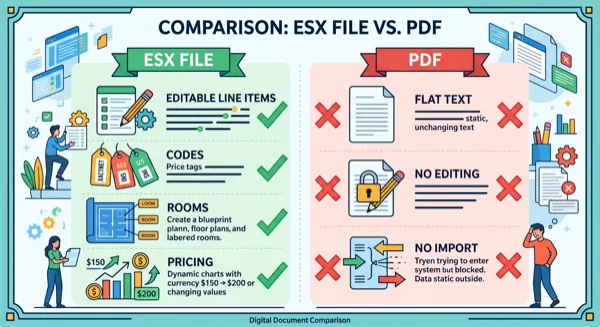
Attempt #3: PDF-to-ESX conversion tool. This is where things actually worked. We started using ProjectEstimatePro in January. Upload the PDF, wait 10-15 minutes, download the ESX, import into Xactimate. On that same 487-line commercial loss that took 3 hours and 47 minutes by hand? The tool converted it in 18 minutes. And the accuracy was around 94%, so we still had to fix a couple dozen codes that didn't map cleanly, but we're talking 20 minutes of cleanup vs. almost 4 hours of re-entry.
The Actual Numbers After 3 Months
Here's what our time tracking showed after we switched:
| Metric | Before (manual) | After (tool + review) |
|---|---|---|
| Avg time per estimate re-entry | 1 hr 52 min | 22 min |
| Monthly re-entry hours (4 estimators) | 127 hours | 29 hours |
| Estimates processed per week | 15-20 | 22-28 |
| Carrier supplement turnaround | 3-5 days | Same day or next day |
The time savings freed up our estimators to do actual estimating work. Scoping losses, writing supplements, negotiating with carriers. The stuff that requires expertise and judgment. Not copying numbers from one screen to another.
It's Not Perfect (And That's Fine)
I'm going to be honest about the limitations because I hate reading case studies that pretend everything is perfect.
The conversion accuracy runs around 93-96% on carrier estimates that came out of Xactimate originally. Makes sense, since the PDF structure is consistent and the line item codes are readable. On contractor-generated PDFs or Symbility estimates converted to PDF? Accuracy drops. Maybe 85-90%. You spend more time on review.
Sketches don't convert. If you need the floor plan in Xactimate, you're still drawing it yourself. This is a genuine gap that nobody's solved well yet.
Really old or badly scanned PDFs are a problem. We had one estimate from a carrier that had been scanned, faxed, re-scanned, and emailed as a compressed PDF. The text was barely readable to a human. The tool couldn't parse it at all. We had to re-type that one the old-fashioned way.
And the tool doesn't handle Symbility-to-Xactimate conversion yet, though I've heard it's coming soon. We still manually convert about 3-4 Symbility estimates per month. That's my next problem to solve.
Where This Is All Going
I'm not a tech person. I'm an operations manager at a 30-person restoration company in Biloxi. But I can see the trajectory here, and it's obvious.
The manual re-entry problem in insurance claims is going to get solved. Maybe not this year for every edge case, but the core use case, taking a PDF estimate and turning it into an editable Xactimate file, is basically solved now. The tools exist. They work. They're not perfect but they're a 90% improvement over doing it by hand.
What I'm watching for next is automated supplement detection. Imagine uploading a carrier estimate and having a tool automatically flag what they missed. The drip edge they didn't include on the roof. The R&R labor they skipped on the drywall. The O&P that should be on a multi-trade loss. That's coming. Some tools are already doing pieces of it.
The adjusters who adopt this stuff early are going to have a huge advantage. More volume, faster turnaround, fewer errors. The ones who don't are going to keep spending 4 hours copying numbers from one screen to another while their competitors eat their lunch.
I know which side of that I want to be on.
Written by
Kristen Morales
Operations Manager, Gulf Coast Restoration LLC
Frequently Asked Questions
I don't think so, and I manage a team of them. What it's replacing is the grunt work, the data entry, the copy-pasting, the hours of re-typing. My estimators are still doing all the judgment calls: scoping, supplementing, negotiating. AI handles the boring stuff so they can focus on the work that actually requires a brain.
In our experience, 93-96% on clean Xactimate PDFs. That means on a 200-line estimate, you might need to manually fix 8-14 items. That's 15-20 minutes of review vs. 2+ hours of manual re-entry. Not perfect, but the math is obvious.
Not anytime soon. Verisk has 85% market share and every major carrier requires it. What's changing is how people get data INTO Xactimate. The manual re-entry bottleneck is getting automated, but the platform itself isn't going anywhere.
Based on three months of real tracking at our company: we went from 127 hours per month of re-entry work to 29 hours. That's 98 hours saved per month across four estimators. In dollar terms, that's roughly $5,000-6,000/month in recovered productivity.
Convert Your PDF Estimates to Xactimate
Upload a PDF and get an editable ESX file in minutes. No manual data entry required.
Try Free ConversionPractical next steps